The latest iteration of DocuWare began rolling out towards the end of 2023 and is now live for all existing and new cloud-based systems. So what did it bring and how can YOU benefit?
By far the most useful addition - certainly for me as a DocuWare developer - is the ability to use tables in DocuWare Forms. This opens up a whole new world of potential uses that will benefit new and existing customers.
At Keeley Travis we've already implemented this in one new project on the HR side. This business holds induction days, to which multiple new starters are invited. Previously they had to email each one individually with all the details. Now they fill in a single form, adding all the expected attendees to a table and an automatic workflow sends the invitations with all the required information.
This cuts the time it takes to set these up in half. At least!
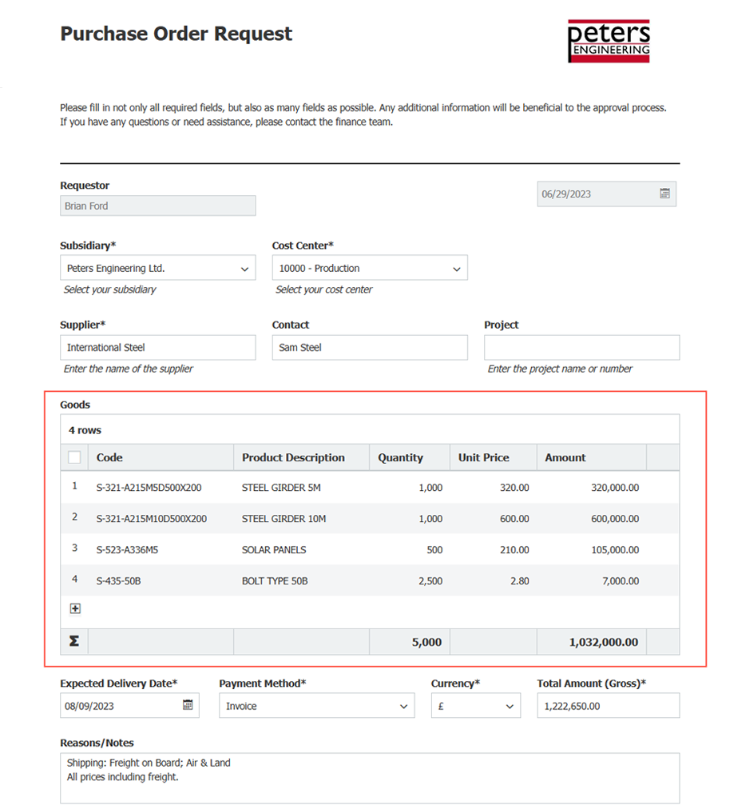
Another use case extends the benefits of DocuWare's preconfigured invoice processing by adding in a purchase request process that precedes the invoicing process. This gives you better cost control and streamlines your accounting.
With tables in forms the capture of structured data is much simpler, laying the foundation for automated processes right through purchase request, purchase order, delivery and invoicing.
The form captures all the data required so that, once the form is submitted and the approval workflow starts, approvers AND DocuWare have all the information they need.
Who needs to approve a request will vary. It could be the purchasing department, a department head or management - or approval could only be required if a request is above a certain value. That would be up to you.
Once approved, the purchase can be raised and sent to the supplier - automatically if you'd like!
This structured ordering process allows for much faster invoice processing down the line too. As soon as the invoice is received, a DocuWare workflow checks whether a purchase requisition exists and links the documents.
Thanks to the data already collected, it is possible to assign the invoice for approval or to initiate a direct release without any loss of time, matching it against not only delivery notes and purchase orders like before, but purchase requests too, line by line.
Even with the development above improving data matching, there are cases where the accounting process is slowed down slight mismatches. For example, where an item number has been entered on the PO as ABC12345, but the invoice says ABC1234S, caused by a bad scan, OCR reading or simple human error, DocuWare would quite rightly flag up a mismatch and require a manual check.
Now though, thanks to "fuzzy matching", DocuWare will now match them as there is a 95% similarity. Again, this will cut down processing time, significantly in some cases.
The addition of a recycle bin - where deleted documents sit for 30 days before permanent deletion, allowing for recovery in case of mistakes - has been very well received by our customers. Now in DocuWare 7.9 it's had an upgrade with filtering options. This makes it much easier to find deleted documents and recover them if you need to.
Exporting of data has also been upgraded with much more flexibility now allowed. This is something you wouldn't see on the frontend, but when it comes to retrieving data for third party systems or just for download, there are a lot more options now available.
Finally, Highlight Search has been greatly improved, meaning when you look up a document from a third party system like Sage, Xero or other ERP, the results will be much more accurate.