We know that not every document requires a clever workflow, approval processes, reconciliation or any of the benefits DocuWare can bring to your business. Sometimes you just want a place to store those documents - and find them quickly and efficiently.
This is DocuWare at its core and what it truly excels at beyond almost all other options. Its range of document capture options, Intelligent Indexing, document retrieval methods, security and document retention policies make it ideal for "just" storage.
Not only that, it is cost effective and quick to deploy.
Documents can be automatically captured from a variety of sources:
And manually via:
All documents will go to a Document Tray, ready to be indexed and stored without a manual touch point if required.
The key to fast, precise document retrieval lies in the indexing of documents - the information we capture from them and provide back as search options.
Key information could include:
We would work with you to determine how you handle documents currently to ensure we capture the right information to suit you.
DocuWare's Intelligent Indexing would then automate the capture of that information from the documents you store, vastly improving the speed at which you file documents away.
With the capture and storage of documents fully automated we can show you how easy it is to retrieve documents.
Again, DocuWare provides several options:
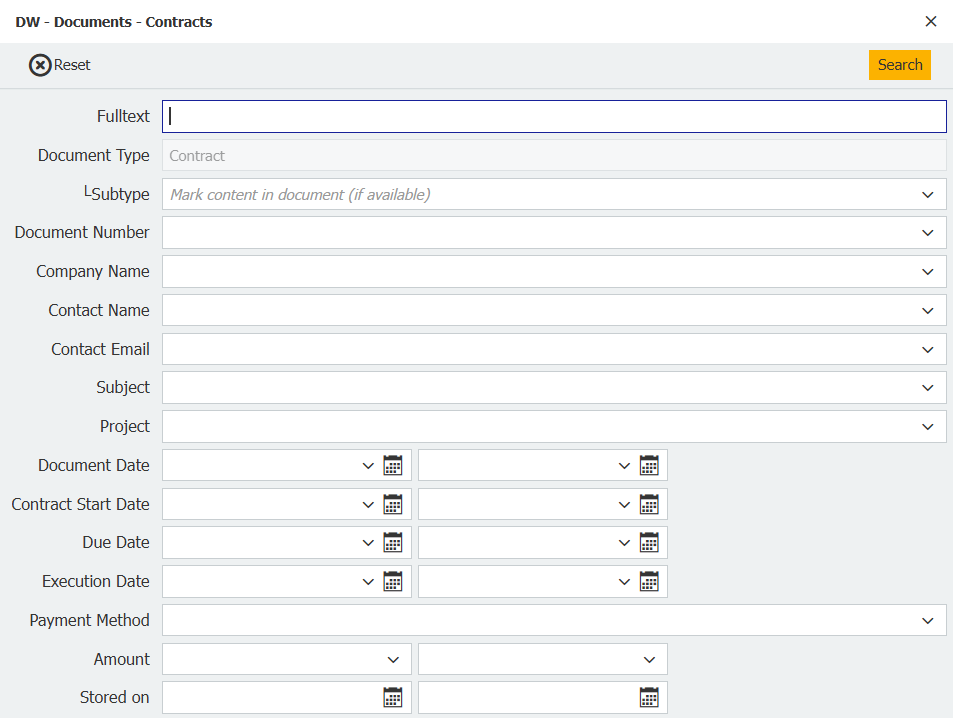
Documents stored in DocuWare can be retrieved quickly and easily using the index fields configured in your system. As long as the information was indexed, you can search by it - and by any combination of them.
In this example for a contract you could search by Company Name, Project, Document Date and/or Contract Start Date. Alternatively, you can use Fulltext search to return every document containing the text or number you enter.
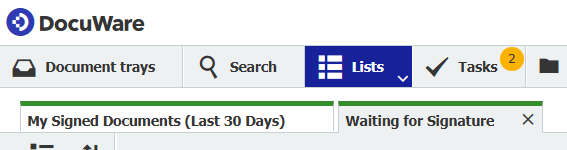
Lists are a function in DocuWare that show a set of documents based on preconfigured criteria. The list is automatically updated with new documents are amended documents in real time.
As an example, Lists are particularly useful when documents require a signature. By using a Status field, you can create the lists Waiting for Signature and Signed in the Last 30 Days - giving you quick access to two dynamically created lists of critical documents.
With DocuWare you can even search for documents from third party systems thanks to DocuWare Smart Search.
Let's say you use project management software but store documentation related to projects in DocuWare.
You are working in the project management software and need to see the related documentation.
Instead of switching systems, you simply highlight the project number, for example, hit a predefined key combination (eg, CTRL + ALT + F) and all DocuWare will open automatically showing you all documents related to that project number.
This is a real time saver when working across multiple systems and it works with ANY system.
DocuWare provides the highest levels of security, protecting your documentation from both external and internal risks.
State-of-the-art document encryption, communication encryption, data separation and data storage and redundancy all come together to provide this security and compliance for your DocuWare system. This gives you total peace of mind, even if you work with highly sensitive documentation.
In addition, access to documents in DocuWare internally can be restricted to individuals, roles and/or groups dpeending on your requirements. Further, permissions can be set on a granular level, allowing some staff to view documents only, whilst others can edit, for example.
Whilst from a business point of view it makes sense to keep documents for a couple of years or more, in some industries there is a legal requirement to keep documents for five, seven, 10 or even 20 years.
This can obviously add up to thousands and thousands of documents, which makes secure cloud storage like DocuWare the perfect solution.
However, you may not want to keep those documents beyond the requirement - legal or or otherwise.
That's where DocuWare's deletion policies come into play.
They can be configured to delete documents based on predefined criteria such as:
As an example, with these options we can set multiple deletion policies to:
This not only meets document retention requirements, but helps you meet GDPR and other legal rules, as well as keeping your data storage quantities to a minimum.
And for everything outlined above there are NO workflows - it's "just" document storage and retrieval. Automated, secure, compliant document storage and retrieval you can put your faith in.
Would you like a demo? Get in touch.