DocuWare's latest version, 7.12, has begun rolling out to cloud customers and should be deployed to all through April and May. But what's new and what will be of use to you?
Let me kick off by saying a lot of the improvements and new features benefit the developer more than the user, but there are some nice little quality of life things coming that you should like. I'll start with those.
DocuWare Intelligent Document Processing (IDP) extends DocuWare's already impressive Intelligent Indexing with powerful AI-driven features. IDP allows for greater automation, increased efficiency and reduced operating costs.
Take a look at our tour if you'd like to see how this works in the real world.
Splitting - DocuWare IDP can split documents automatically without the need for barcodes or separator pages by intelligently recognising the beginning and end of document types, allowing you to batch scan documents without manually splitting them.
Classification - alongside splitting, documents can also be intelligently, automatically classified into categories or groups, as IDP can be configured to recognise document types via recurring content.
Extraction - just like Intelligent Indexing, DocuWare IDP can extract and index key information from documents. But it goes further, handling complex line items, tables within tables and can even extract data from poorly scanned, crumpled or stained documents!
Extraction for Handwriting - Using Handwritten Text Recognition (HTR), DocuWare can now read handwriting! With an ever improving 80% (approximately) accuracy rate, DocuWare IDP allows for the extraction and indexing of handwritten documents.
Accounts Payable Process - IDP allows for even more automation in accounts payable, with the ability to automatically ready even the most complex invoice structures. In addition, it and HTR mean that even the worst cases of delivery note can be processed automatically, reducing the amount of manual input required dramatically.
DocuWare IDP can be integrated with on-premise and cloud systems via workflow manager (classification, extraction and HTR), StorageRobot (splitting, classification, HTR) and Connect to Mail/IDP configuration (classification, extraction and HTR).
In addition, there are three AI models to choose from:
Please note, there is an additional cost for DocuWare IDP.
With 7.12 comes the inclusion of annotations and stamps when fulltext searching. This allows for better search results and the ability to further fine tune your searches. As an example, if an order number appears only in a stamp and not on the document itself, searching via that number would now return that document.
The use cases for this are many, but anything that improves search is a significant boost for DocuWare users.
Another little time saver will be the addition of clickable links in search results, lists and folders. Once a hyperlink is stored in an index field with a document, users can click directly to wherever the link leads. This could be a document or result in a third party system, a webpage or a video hosted YouTube, Vimeo or even an internal intranet.
A particular bugbear of mine has been fixed - previously, if you selected wrongly from a dropdown on a DocuWare form with automatically filled fields, you would have to reload the form. Now, the prefilled fields dynamically change based on what you select WITHOUT having to reload the page.
It's tiny - and it probably doesn't affect you - but for some of our customers, this will be a game changer, believe me!
There are a slew of changes to the Security component of DocuWare in 7.12, not least the fact it gets its own section. Security options have traditionally been house din the Organisational Settings section of DocuWare's configuration, but with the introduction of new features, it does deserve its own home!
One such feature is the ability to whitelist domains - a requirement of the clickable hyperlinks I talked about earlier. In addition a secure password policy is active by default, meaning passwords MUST be a minimum of 10 characters and contain at least one lower case letter, one upper case letter and one number.
You can also enable "Restricted file types" (active for new systems, requires enabling for existing systems). This prevents any kind of potentially harmful executable file from being stored in DocuWare.
Finally, the DocuWare passphrase is no longer displayed in plain text to protect against visual hacking.
Please note, in DocuWare 7.12 the Product Overview section has been moved into the Organisational Settings component. Product Overview contains license information, number of stored documents and storage volume (available, used and free).
Some nice quality of life improvements for those who manage DocuWare users will roll out too.
One of the simplest is the ability to assign licenses to groups. You create a group - let's say "Workflow Users" - assign all the users you wish to it, then assign, in this case, a workflow license to everyone in the group with a single click. A big time saver for DocuWare managers!
User Syncronisation - which allowed users to be added and removed from DocuWare via a Microsoft Entra group (for example) - has been upgraded and renamed User Provisioning, with the following applications and benefits:
Automated User Provisioning: Automatically create, update, and deactivate user accounts across multiple applications (Identity Providers <-> DocuWare), reducing the need for manual intervention and minimizing errors
Centralized Management: Manage user identities and access rights from a single interface, providing a unified view of all user accounts and their permissions
Data Synchronization: Ensure that user information is consistently updated across connected systems, maintaining data integrity and accuracy
Group Provisioning: Efficiently manage access for groups of users, allowing for quick and easy assignment of permissions based on roles or departments
Security and Compliance: Enhance security by ensuring that only authorized users have access to necessary applications, and maintain compliance with industry standards and regulations
This works with Azure Entra, Okta and Ping.
Another addition includes the ability to export the user list - including name, email status and license - to a CSV. Great for a quick overview of the user base.
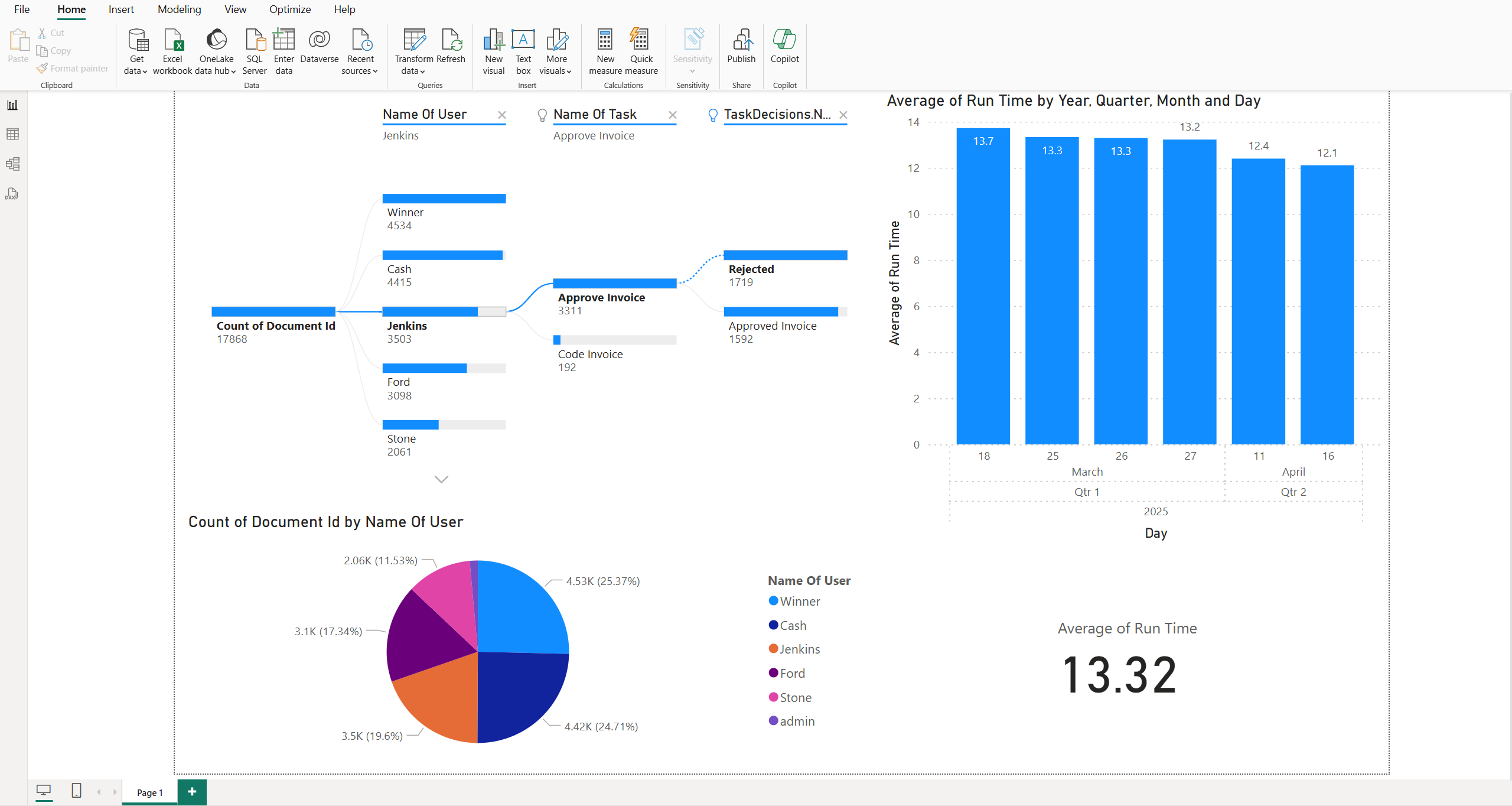
Finally, there is a new DocuWare API for Workflow Analytics, which works hand in hand with the new DocuWare Power BI Connector.
Essentially, this can provide structured data to Power BI to display key efficiency information. This could include number of invoices processed by department, for example, or the average workflow duration or how long it takes for Tasks to be completed.
If you have business questions like:
How many invoices have been stored or processed over what period of time?
How many tasks are currently assigned to employees?
How many invoices are approved for payment?
Which workflows take the longest time or have bottlenecks?
How quickly are tasks processed after they are assigned?
Well, then this is your answer.
Personally, I can see this being used in many more ways in the future, bringing easily digestible business information into DocuWare via charts, diagrams and tables, something only currently achievable through a third party like Power BI or Intuitive.
Overall, 7.12 is an upgrade for DocuWare as a whole, bringing greater structure and abilities to the system. From an existing user point of view there's nottoo much to get excited about but I believe you should view this update as another step in DocuWare's continued evolution as the best document management and automation solution on the market.