

By Keeley Travis on Oct 1, 2025, 3:47:23 PM
All new DocuWare systems created will now be on version 7.13, whilst older cloud systems are being upgraded over the next few weeks. But what do you get with the latest version?
It's been roughly six months since the last update was rolled out. Plenty of time for new stuff, right? Right. And as ever, some new features benefit the developer and some the end user (and ultimately, both!).
For our DocuWare customers, present and future the ability to prefill and effectively "save" forms is a game changer. Let's have a look a this in detail.
Prefilled DocuWare Forms
Let me be honest here; from my point of view this is a little clunky to use right now and has some limitations. But it is a huge step forward and can be very valuable in its current state.
The new feature means that:
- You can partially complete a form and save it for later submission
- You can partially complete a form and share it with a colleague to complete and submit
- Developers can pre-fill forms by editing the form link with URL parameters
- Workflows can be used to pre-fill forms with captured data from index fields
This improves data accuracy and allows collaboration on forms which was not previously possible.

There are some limitations. Table data and signatures cannot be prefilled and attached files cannot be retained. The form URL is also capped at 1800 characters, which does put a limit on how many fields can be prefilled, though the actual number will vary from form to form.
Workflow Designer
The workflow designer has now been fully baked into the web, which removes the need for the Desktop App. For developers and administrators this is very useful - though takes some getting used to!
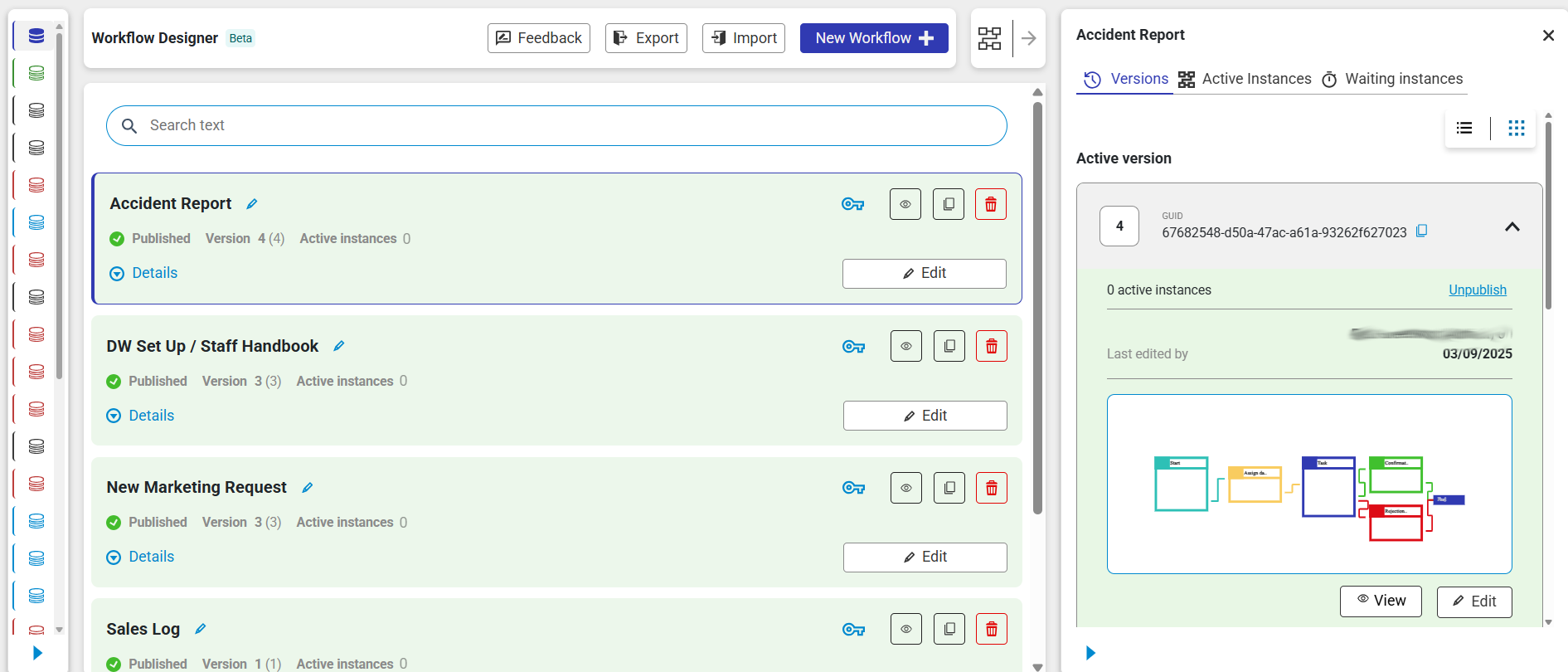
Key to the transition is the ability to migrate workflows form the app to the web version - the app will eventually be removed so creating workflows in the Configuration of the DocuWare system itself is something I will be doing from today (01/10/2025).
WHY the change though? Several features and benefits:
- Automatic saving of workflows during and after the build - no more lost work
- Undo/redo function - no need to start from scratch
- Multi-selection - copy, paste and delete multiple actions for faster, more powerful flow building
- Individual workflow exports - export only the workflows you want for use in other systems (used to have to export ALL)
- New keyboard shortcuts - faster workflow creation
- Decision makers assigned directly in Tasks - greater clarity and flexibility, tidier workspace (used to be its own "Assign to" element)
Automatic e-Invoice Identification
Although certain European countries are well ahead of the UK when it comes to e-invoicing - France, Germany, Spain, Poland and Italy for example - it is very likely to become commonplace over here before long too. Indeed, it is mandatory between UK business and government already.
What is it? The digital exchange of invoice data between businesses' financial systems - in other words, not just a PDF emailed over.
How does DocuWare 7.13 come into play? E-invoices can have a variety of formats (eg, UBL/CII) - now with 7.13 DocuWare can automatically identify and process e-invoices in many formats. This will prove very valuable for UK businesses dealing with the EU.
All you need to do is create one configuration for each format and invoice received in that format can be identified and processed automatically.
2FA
DocuWare has added two factor authentication to user log ins for an extra layer of security. Once activated, users will need to enter a six-digit one time password - provided by an authenticator app on their mobile phones - each time they log into the system.
Additionally, this can be set on a user by user basis too - which will allow for users to log in even if they lost their phone, for example.
Conclusion
While 7.12 was a step forward for DocuWare administrators, 7.13 has far more customer-centric benefits. I'm excited to get working with prefilled forms and the new workflow designer as it opens up even more scope to provide a document management suit almost every business process.
Get in touch if you'd like to know what DocuWare can do for your business.
DocuWare Version 7.11: What's new?
DocuWare Version 7.12: What's new?
No Comments Yet
Let us know what you think