

By Keeley Travis on Jan 23, 2024, 10:58:44 AM
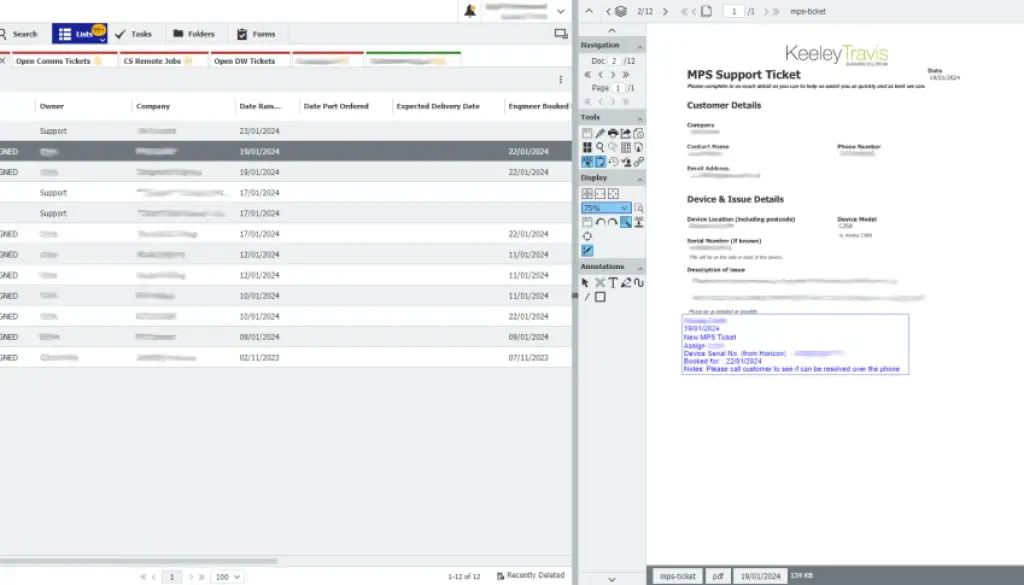
Whether your business supplies products or services, providing an easy way for customers raise queries with you that can be dealt with quickly and by the right people should be a priority. Nothing beats customer service when it comes from differentiating you from the competition.
DocuWare's online Forms and automated workflows provide an easy to use, robust and highly trackable customer support system which will prove invaluable to your business.
Benefits of a DocuWare Support Ticket System
- Cut down on incoming calls, freeing up your staff to focus on service
- Eliminate lost or ignored incoming email requests, resulting in high customer satisfaction
- Provide customers with an easy way to raise a ticket - no hanging on the phone or waiting for email replies
- Keep customers updated automatically, improving customer confidence and satisfaction and increasing brand reputation
- Auditable ticket history so you can see who is performing well and who is not
DocuWare Forms
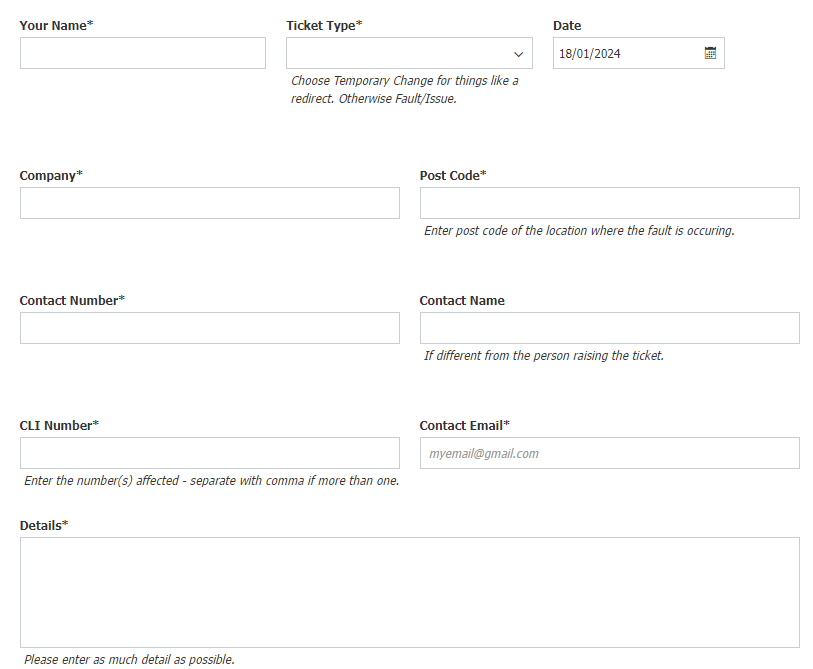
A DocuWare Form is easy to build, easy to use and guarantees you are collecting the right information - and enough information - in order to be able to address any issues raised.
Take IT support as an example. You would probably need to collect the following information as a minimum:
- Company Name
- Contact Name
- Phone Number
- Email Address
- Details of the problem
- Affected user(s)
In addition you might want to collect the ID or serial number of the hardware involved and/or screenshots or documentation supporting the query.
A DocuWare Form can achieve all of that, as well as recording the date and time of the submission automatically. Below is an example:
Automated Ticket Assignment Communication
Once the customer has submitted the form - or ticket - DocuWare indexes the information and automatic workflows determine who the ticket should be assigned to based on the information provided. This could be done on customer if you have account managers, type of query or availability of support staff, as examples.
This assignment raises a Task within DocuWare and notifies the recipient that they have a new ticket. In addition, the customer is automatically emailed to inform them the ticket has been received and is being actioned. You can even attach a copy of the ticket to the email.
There could be a number of different types of resolution to a support ticket and you can include these as part of the DocuWare Task. They could include:
- Resolved over the phone
- Resolved remotely
- Engineer visit required
- Customer action required
- Close ticket
It would look something like the image below and can, of course, be configured to suit however you work.
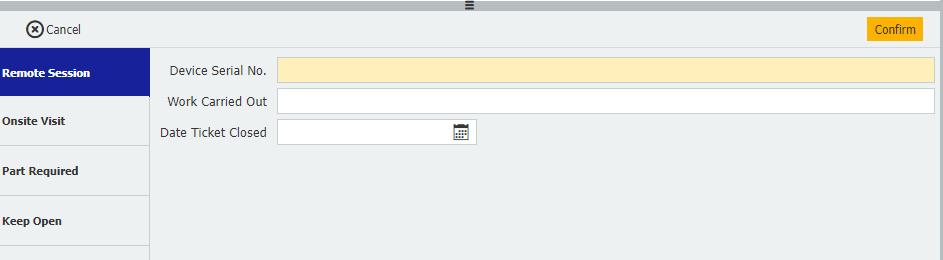
Depending on the response to the initial task, tickets can be closed, rerouted, put on hold or even kicked back to the customer.
Let's say the ticket comes into our fictional IT support and is assigned to a member of the customer support team. They review the ticket and immediately know that an engineer will have to visit the customer.
In the example above they would choose "Onsite Visit" and could be offered a number of fields or dropdown menus to complete, such as the engineer they want to assign, the date and time they want the onsite visit to take place and the work they need carrying out.
Confirm the task and the engineer selected would have a task raised in DocuWare and an email notification. It's even possible to automatically book the visit into their online calendar. And the customer, of course, would be automatically notified too.
The ticket would be routed to the right people based on the decisions made at every step until the issue has been resolved and every decision taken can be communicated to the customer automatically (if you choose!).
This workflow process can be configured to match or improve on your current manual processes, automating almost all of it and allowing your support staff to focus on the customer, not the process.
Tracking Auditing
From the moment a customer raises a ticket right through to the moment the ticket is closed, every action is recorded and, if you wish, stamped onto the original document.
DocuWare tracks workflow actions AND document actions. The former shows where the doucment has been sent, what decisions were taken and which emails have gone out, whilst the doucment history shows who has viewed the doucment, what changes may have been made to it and, perhaps most importantly, when.
This allows you to track response times, review support staff performance, identify bottlenecks and problem equipment (or customers!) and improve your processes even further.
If you're looking for an affordable, comprehensive customer support system then DocuWare could well be the answer. Talk to Keeley Travis today on 0161 683 4247 or drop us an email and we'll discuss your needs.
DocuWare Version 7.11: What's new?
DocuWare 7.8 is rolling out - here's what you get
No Comments Yet
Let us know what you think