

By Keeley Travis on Feb 21, 2024, 10:20:22 AM

With the roll out of DocuWare 7.9 came automatic table calculations in DocuWare Forms. This opens up a whole new world of possibilities for automation and processing in your business.
What this means is you can now perform automatic calculations between numeric columns, aggregate across multiple tables and even use other numeric fields on the form to create formulas - and all before the form is even submitted.
This means:
- Faster form completion with less data to enter
- Automated calculations, removing manual tasks and preventing errors
- Easier, faster processing of form submissions
DocuWare themselves recently published an article with travel expenses as a use case to demonstrate how this new functionality can be used. The following is an extract from that article.
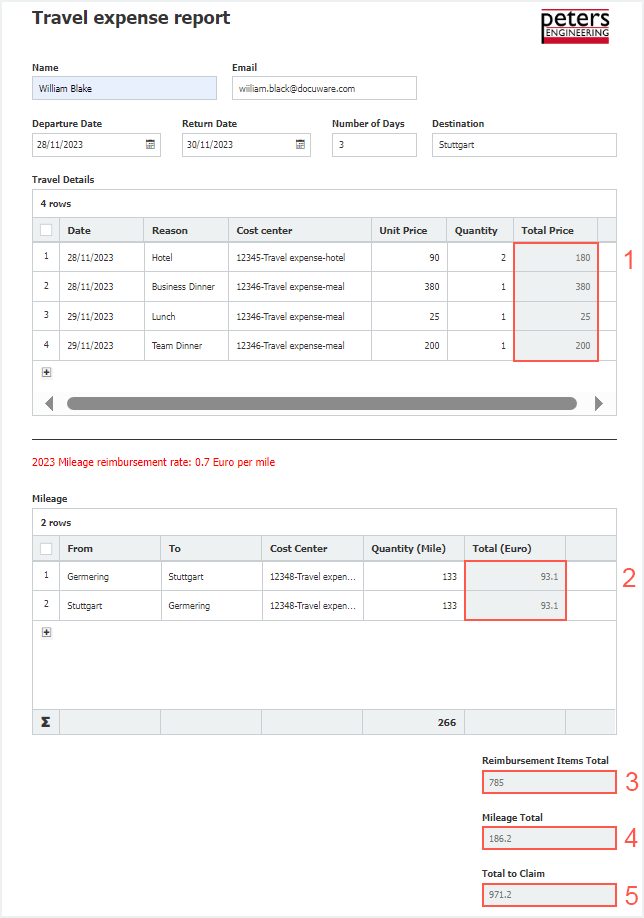
These are the calculations carried out within the form:
- Travel Details: For each item the colleague entered, the unit price is multiplied with the quantity to get each total price.
- Mileage: For each distance traveled, the reimbursement is calculated by multiplying the number of miles with a fixed rate, in this example 0,7 euro per mile.
- Reimbursement Items Total: For this field, the sum of the entries from column “Total Price” of the first table is generated.
- Mileage Total: The sum of the entries from column Total (Euro) of the second table is displayed in this field.
- Total to claim: Here you get the sum of the calculations 3 and 4.
The automatic calculations are beneficial for both the employee filling out the form and the accounting staff. The requestor directly gets the calculation results as information, for the accountants it saves valuable time and avoids the possibility of human error in calculations.
And since all calculated values can be used as index entries, they can also route the travel expense claim in the process. For example, if the total is more than 1,000 Euro, the claim is automatically routed not only to the manager for approval, but also to the appropriate person in the HR department.
This is just one example of how this new functionality can provide significant benefits for your business. Remember too that DocuWare Forms allow the upload of receipts and other supporting documents, so you have everything you need to approve and process an expenses claim efficiently.
It can, of course, be applied to other areas such as procurement and purchasing, order processing and stock management. Genuinely, the possibilities are (almost!) endless.
DocuWare continues to innovate, adding more and more value to our document management solution - why not speak to us today to find out more?
Your DocuWare, your way
DocuWare Version 7.13: What's new?

No Comments Yet
Let us know what you think