

By Keeley Travis on Sep 16, 2024, 9:19:42 AM

The human resource process is a lengthy one and typically involves a lot of paperwork in terms of application forms and supporting documentation, interviews, handbooks and onboarding documentation, appraisals, holiday requests, disciplinaries and eventual employee exits or terminations.
It's a lot for HR staff to manage in terms of both storage and retrieval. That's exactly where a document management solution can support these processes - simplifying and, indeed, automating much of it.
The key areas are:
- Recruitment
- Onboarding
- Employee Management
- Employee Exit/Termination
Let's look at the detail of each individually and how our document management solution, DocuWare, can radically transform each step.
There is a preconfigured human resources document management solution for DocuWare which is infinitely configurable to any organisation's needs. What the preconfigured solution does do is significantly reduce the time it takes to implement DocuWare for HR into a business.
Some of the functions of DocuWare we'll explore include DocuWare Forms, DocuWare Workflows, DocuWare Tasks, document storage and retrieval, digital signatures and automated email.
We'll use a scenario where the marketing department of an organisation wants to hire a new marketing executive. We'll take that initial need right though to the eventual exiting of the business by the employee.
Recruitment
In our scenario we'll look at the marketing department of an organisation wanting to hire a new marketing executive. We'll take that initial need right though to the eventual exiting of the business by the exec.
Personnel / hire request
To kick off the hire request, the Head of Marketing completes a simple DocuWare Form online. Information required could include:
- Job title/role
- Salary
- Preferred start date
- Job description
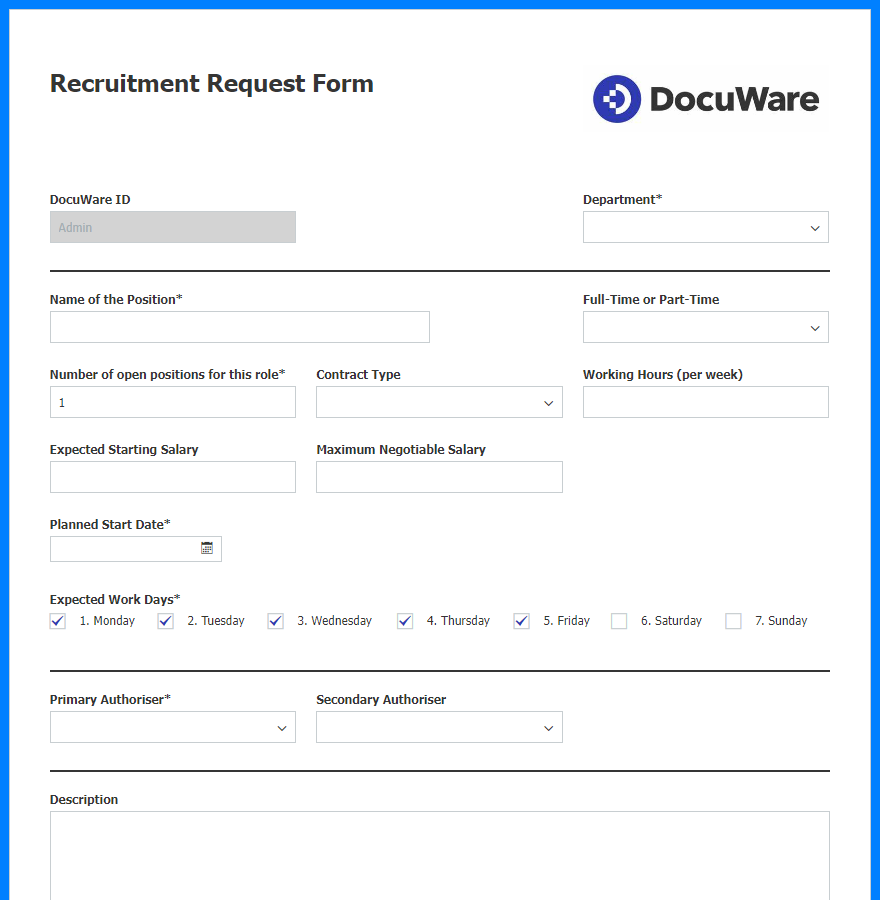 A DocuWare form is used to create a new open position.
This is completely customisable to your requirements. Once complete and submitted the request is automatically directed to whoever needs to review and approve it.
In this organisation a hire request has to be approved by at least one director. A task is raised in DocuWare and an email notification sent to each of the directors, informing them of the request and asking them to review it.
The director views the submitted form in DocuWare and makes the decision by confirming 'Approve' or 'Reject' on the task. This completes the task and removes it from the tasks assigned to the other directors.If required, DocuWare can be configured to require two or more director approvals before the hire is confirmed to the Head of Marketing.
If the hire request is rejected, the document would be archived and the Head of Marketing would receive an email informing them of the desicision and, if required, the reason why.
In this case, we'll assume the hire request is approved. The Head of Marketing is informed and, crucially the open position is created in DocuWare, making it available for application forms.
The position can then be advertised as normal, with applicants invited to apply via another DocuWare Form.
Application form
The DocuWare application form is available to use by anyone with the direct link. Once the form is loaded up, an applicant would choose the role they are applying for from a dropdown populated only by open positions created by the hire request form at the start of the process.
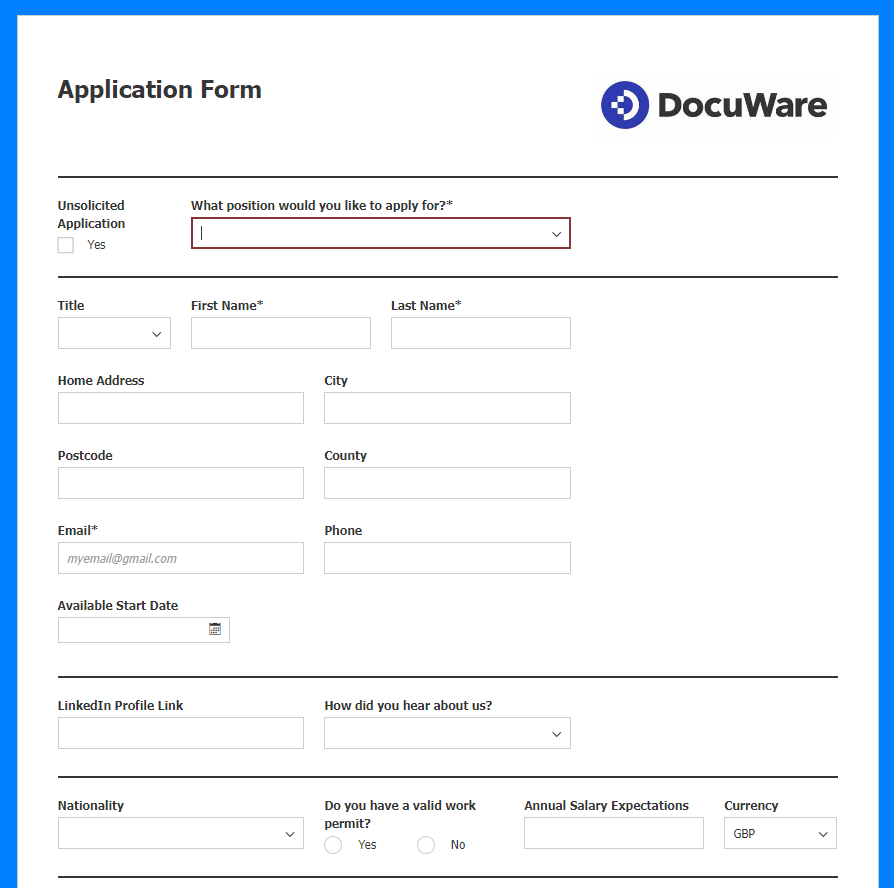 The job application form can be configured to capture all the information you need and designed to suit your company brand.
The application form can be configured to match existing paper application forms, capturing all the required information such as name, email, phone number and referees. In addition, covering letters and CVs can be uploaded too. Whatever is required to decide on who to invite for an interview.
Application review
Once reveiwed, the Head of Marketing and the HR department can review the applications, including the attached CVs and covering letters within DocuWare, searching by job role, date and any other criteria captured from the application form.
A DocuWare Task is also created to decide whether to reject the applicant or invite them to an interview.
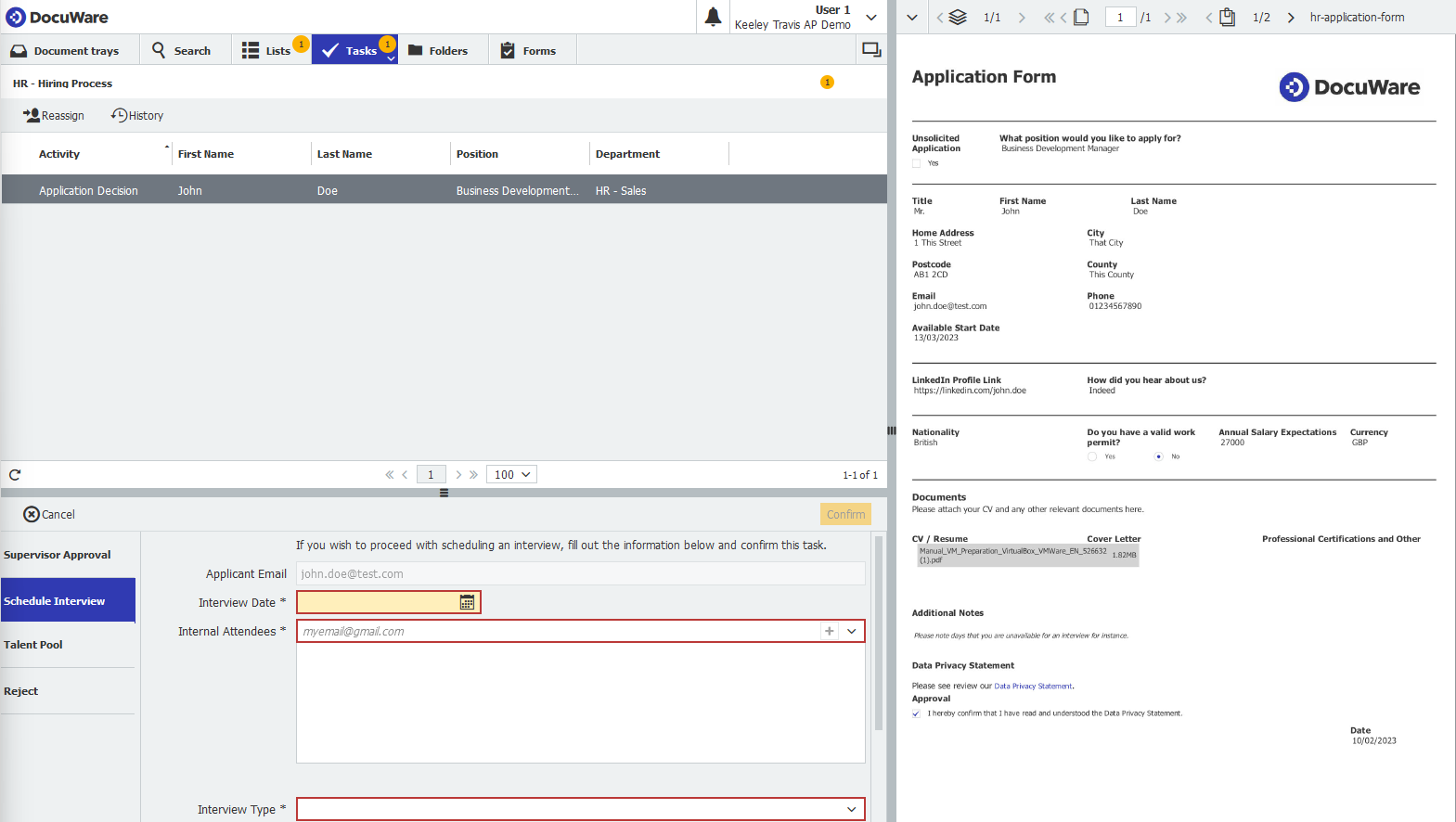 The DocuWare dashboard showing an application and the Schedule Interview task.
If rejected, the applicant would receive an automated email informing them of the decision and, if you like, wishing them luck for the future.
Interview invitations
Should an applicant appear suitable for the role, however, "Invite for Interview" would be chosen from the task and fields for date, time and location can be filled in before confirming the invitation. An email would then be automatically sent to the applicant containing those details. Furthermore, that email could contain a link to another DocuWare form for them to confirm their acceptance.
Once accepted, another task would be created in DocuWare ready for after the interview. This task could include the following options:
- Reject - which would send an email to the interviewee informing them of the decision
- Invite for 2nd interview - repeating the process outlined here
- Offer Job - if they impressed enough to be successful. This would kick off a whole new process automatically, which we'll detail below
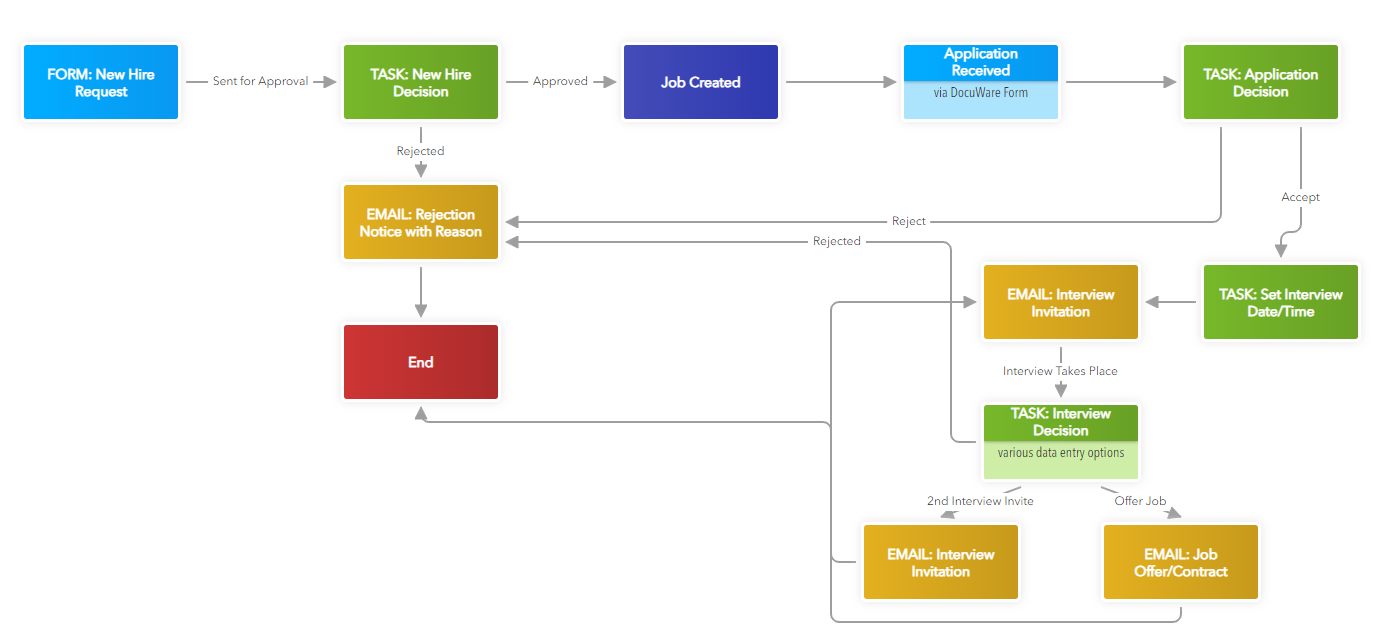
It's worth noting here that questions and answers from the interview could also be entered into a DocuWare form and stored for later review and used to trigger the above the above task.
Reference requests
At some point during the process described so far, you may wish to request references from those provided in the initial application. Assuming you have captured email addresses for them, DocuWare can be configured to email the referees at any point you like, asking them to complete a short DocuWare form about the applicant. This saves a lot of time manually emailing or calling around. Reminders can even be sent after a predetermined amount of time should the reference not be received.
Job offer and acceptance
In our scenario the Head of Marketing liked a particular candidate and wants to offer her the job. He confirms the task described above with "Offer Job".
This task could allow the inclusion of additional information such as start date, offered salary, holiday entitlement and other details. This information can be used to pre-populate an offer letter and/or contract of employment.
Once confirmed, an email is sent to the successful applicant with the job offer and a link to confirm their acceptance and digitally sign the contract of employment.
DocuWare can be integrated with DocuSign or ValidatedID to propely capture valid digital signatures.
Should the applicant accept the role the recruitment process ends. The open position is marked as closed and is no longer available via the application form.
The onboarding process then begins and tasks pass to the HR department exclusively.
Onboarding
The onboarding of a new employee can be as simple or complex as you like. DocuWare will automatically create an employee record form the information already submitted via the recruitment process, but you're going to want to capture more information such as next of kin contact details and bank details for salary payment. This would be done by your new employee completing an onboarding form.
In addition, you might want to automate a request to IT department/supplier to create and assign new email address/phone number (and DocuWare account!), supply new hardware (laptop, phone etc) and a request to Payroll to set the new employee up. Even these processes themselves can be automated to an extent via DocuWare.
In our scenario, we'll keep it simple. The HR department receives the applicants acceptance of the job and the signed contract of employment. They initiate the onboarding process by confirming the receipt via a DocuWare Task.
The applicant receives an email asking them to complete the onboarding form to capture the extra information required and could even incclude the Employee Handbook as an attachment.
Emails are also sent to IT and Payroll, informing them of the new employee, their details and requirements and the start date, configured way back in the recruitment process. This ensures that when the new employee arrives on their first day everything is in place for them to get to work immediately.
Employee Management
With the new employee onboarded and working, both the Head of Marketing and the HR department will be responsible for various tasks during her time with the organisation.
This could include:
- Holiday requests
- Appraisals
- Promotions, salary and contract changes
- Disciplinaries
All of these produce documentation and can involve lengthy manual processes. Again, DocuWare can simplify and automate many of them, as well as provide the storage and easy retrieval of the documents. Let's look at each one to see how.
Holiday requests
Each employee record will hold the employee's holiday entitlment for this year and next year. When our employee wants to book a holiday she simply completes a DocuWare Form indicating the start and end days and the number of days she would like to take.
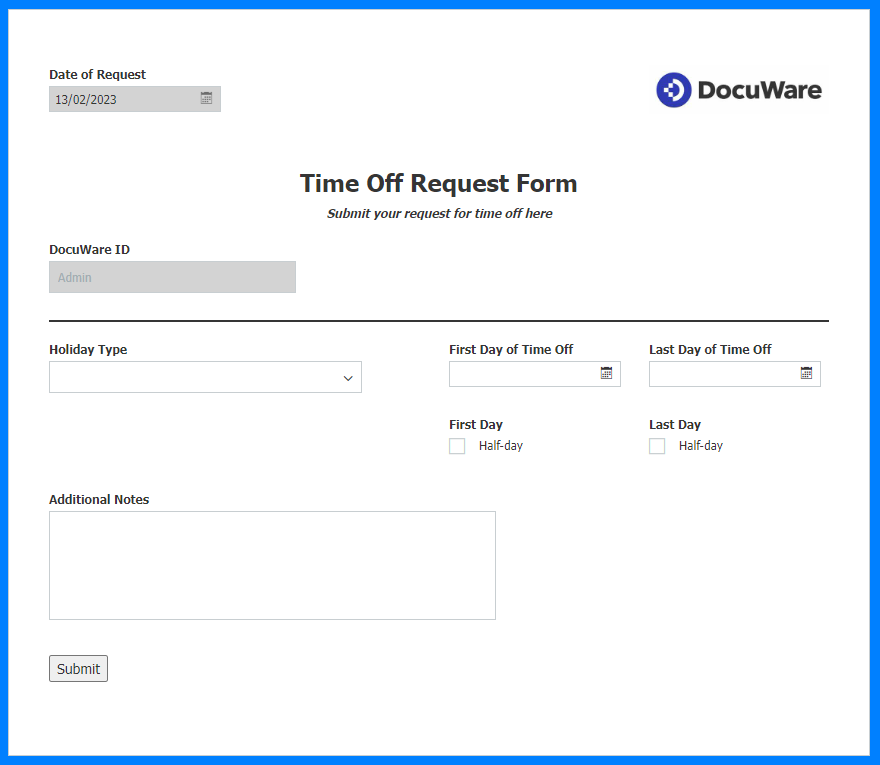 Holiday management is automated to free up HR staff from dealing with requests.
When the form is submitted DocuWare checks the request against remaining holiday days. If the employee does not have enough entitlement left, the request is automatically rejected and she gets an email saying why, letting them know how many days they have left so they can book a holiday more appropriately.
If she has enough days, the request gets sent to her manager - in our case, the Head of Marketing. He can then approve or reject the request. In this case, there's no issue and the holiday is approved via a DocuWare Task. At this point DocuWare will automatically:
- Inform our employee the request has been approved
- Deduct the days from her entitlement against her employee record
- Inform HR via email
It really is as simple as that.
Appraisals
Whether these are carried out annually or more often, DocuWare can be configured to notify heads of department or HR that an employee's appraisal is due ahead of the actual date. How far ahead is entirely up to you.
Our marketing exec has her appraisal every six months. Two weeks before the date - which is stored against her employee record in DocuWare - the Head of Marketing gets a task to arrange it, inluding confirming the date and time. Once the task is complete, the employee receives an email informing them of the appraisal.
On the day, a DocuWare Form can be used to record the details of the appraisal - targets, comments etc - and can be signed by both employee and manager before being submitted. Once it is, DocuWare automatically sets the date of the next appraisal six months ahead and the form itself is stored for later review if required.
This automates scheduling and ensures that an appraisal is never missed.
Promotions, salary and contract changes
Any time a contract of employment needs updating it requires a signature - the whole process can be managed from within DocuWare. Let's say our marketing executive has performed brilliantly. She is reqarded with a promotion to Marketing Manager, a payrise and an extra couple of days holiday entitlement.
The HR department completes a simple form, selecting the employee from a dropdown menu and updating their details in a couple of index fields. Thsi generates a new contract of employment which is sent via DocuSign to our new Marketing Manager for signature. She simply signs it, it's stored safely in DocuWare and the Head of Marketing is notified it's been completed.
All very quick and simple!
Disciplinaries
These are handled in much the same way as appraisals, via form, tasks and email notifications. In addition though, DocuWare can be configured to notify heads of department and HR should an employee receive a predetermined number of didisciplinaries in a certain amount of time or to set reminders to review one.
Hopefully these won't be required too often, but DocuWare can manage the process and provide transparency and security too.
Employee Exit/Termination
When an employee leaves a business, for whatever reason, there is a certain amount of administration involved. DocuWare can both spee dup this process and ensure that nothing is missed.
Where DocuWare is concerned, the HR department can complete a simple DocuWare Form, selecting the relevant (ex)employee, entering their last working day and clicking submit. DocuWare can be configured to:
- Change the status of their employee record from Active to Inactive, thus removing access
- Automatically inform Payroll so they can do what they need to do in terms of final payments
- Raise tasks for the IT department to confirm returned equipment like laptops and mobile phones and to redirect emails to relevant people
The process - business-wide - is virtually automatic and much quicker to complete.
Access Security
DocuWare's powerful security features allow you to set access permissions on a very granular level. If we take the documentation created throughout the HR processes described above, we can give you an example of how permissions can be created.
- Hire Request - accessible to directors only
- Application Forms (and attached CVs/cover letters) - department head and HR access only
- Interview notes - department head and HR access only
- Employment Contracts - HR, directors and employee only
- Holiday Request Forms - HR, directors, department head and employee
- Appraisal notes - directors, heads of department and employee only
- Disciplinary notes and forms - HR, directors, department head only
These granular permissions are backed up by DocuWare's state of the art document and communication encryption standards, back up and disaster recovery protocols and privacy compliance (GDPR, HIPAA etc), all of which ensure complete security for your business documentation and processes.
Notes
All forms, workflows and processes outlined above can be configured for specific business requirements.
Any forms or workflows not required can be easily disabled or removed.
All forms can be branded with company logo and brand colours.
DocuWare's human resource document management solution can be extended to include training, certifications and more.

CASE STUDY: How Medlock FRB automates subcontractor management with DocuWare

CASE STUDY: How - and why - does Keeley Travis use DocuWare?
No Comments Yet
Let us know what you think